How to Build a Daily Routine That Actually Works (with Time Tracking Tips)
Struggling to find a groove in your day? Whether you’re a student juggling classes and study time or a remote worker trying to stay productive from home, building a daily routine can feel daunting. But a little structure can go a long way. In this guide, we’ll walk through how to create a daily routine that actually works - one that improves your focus, lowers stress, and boosts productivity - with practical tips on time tracking (and a friendly nudge to try tools like InstaClock along the way). The tone is casual and personal, so grab a coffee and let’s design a routine you’ll love!
Why Having a Routine Matters (Especially for Students & Remote Workers)
If your days are a blur of Zoom calls or lectures, random chores, and procrastination rabbit-holes, you’re not alone. The freedom of an unstructured day can backfire - leading to distractions, stress, and that nagging feeling of “Did I even accomplish anything today?” A simple daily routine is like a framework that holds your day together. In fact, establishing a daily routine has been shown to improve productivity and reduce stress , because when you have a clear structure for your day, you know exactly what to focus on and when. Instead of reacting to whatever comes up, you’ll feel more in control and organized , which is a huge relief in a hectic student life or work-from-home setup.
Consider this: one psychology expert notes that adding structure and predictability (like set wake-up, meal, and work times) can help you feel less stressed and more organized. Once basic tasks become routine habits, they require less effort and free up mental energy for other things. You start each day with a plan, not a panic. And that translates into better focus, a calmer mind, and more done by day’s end.
For remote workers, a routine also separates “work time” from “home time,” preventing that hazy blend where you’re never fully “off.” For students, it means carving out regular study periods and downtime so you don’t end up cramming or burning out. In both cases, a routine is your secret weapon for a productive daily schedule that still feels sane. (One fun statistic: 92% of highly productive people stick to a structured morning routine , showing just how powerful that first hour can be !)
Routine-Building Tips That Stick (No Rigid Schedules Here)
Building a routine doesn’t mean scheduling every minute or turning into a robot. The best routines are flexible, personal, and actually enjoyable. Here are some battle-tested strategies to design a routine that sticks, with a warm and realistic approach:
Time Blocking: Schedule Your Focus
Have you ever looked at the clock, realized half the day vanished, and you’re not sure where it went? Time blocking can save you. Time blocking means dividing your day into chunks dedicated to specific tasks or categories of work. Instead of a daunting open to-do list, you’ve got “blocks” on your calendar (e.g. 9-11am: Deep work on Project , 11-11:30am: Emails , 11:30-12:00: Break ). This method, reportedly used by some top CEOs, can boost productivity by up to 30% , largely because it provides a structured game plan for your time. When you know “This afternoon from 2-4 is solely for my research paper” , you’re less likely to drift into Netflix or social media during that slot.
Time blocking works wonders for remote workers who might struggle with “always on” syndrome - it earmarks work time versus personal time clearly , helping you log off when you should. It’s equally powerful for students juggling classes, homework, and extracurriculars, ensuring everything finds a place on your schedule. Importantly, blocking out time helps prevent multitasking overload. Research shows multitasking can slash productivity by up to 40% , whereas focusing on one task per block keeps you efficient and sane. By planning your day in blocks, you eliminate a lot of small decision- making moments (“Hmm, what should I do next?”), which reduces stress and decision fatigue. The result? You glide through your day with purpose, and your brain isn’t frazzled by constant context- switching.
Practical tip: Start by blocking your priority tasks during your peak productivity times. If you’re sharpest in the morning, reserve that for your hardest work (writing that code, studying for that exam). Save lower-energy tasks (like answering routine emails or organizing notes) for the post-lunch slump. Treat these blocks as appointments with yourself - when the calendar says “study 3:00-4:00,” you focus on that and only that. And don’t forget to build in buffers for the unexpected; life happens, and it’s okay if a block occasionally moves. The goal is a guiding structure, not a prison schedule.
Task Batching: Group Similar Tasks Together
Do you ever notice how switching between unrelated tasks - say, writing a report, then answering a text, then back to the report - makes you feel scattered? That’s because every time you switch, your brain has to play catch-up. Task batching is the antidote. It means grouping similar tasks and doing them in one dedicated batch. For example, instead of checking email 10 times a day, you batch it into, say, two 30-minute slots. Or you lump all your class readings into one afternoon, and all your household chores into another chunk.
The benefit is huge: by dealing with similar tasks in each chunk, you avoid the mental strain and “attention residue” of constant task-switching. Your brain can settle into one mode (writing mode, email mode, house-cleaning mode) and hit a flow. This increases focus and even helps reduce stress - studies show constant interruptions and switching spike our cortisol (stress hormone), while batching minimizes those interruptions. In other words, batching is a brilliant productivity hack for a productive daily schedule : it keeps you in the zone and lowers the chance of silly mistakes that happen when you’re juggling too much.
Practical tip: Identify recurring tasks in your life that you can batch. For students, this might be scheduling specific times for responding to discussion boards, so you’re not dropping in and out all day. For remote workers, maybe batch all meeting calls in the afternoon, leaving mornings free for focused work (or vice versa, depending on your personal peak times). Even personal tasks can be batched - run all your errands in one go, prep meals for the week in one session, etc. Batching not only saves time, it also feels satisfying - you tick off a whole category of tasks and free your mind to move on. As one source puts it, grouping tasks reduces the “mental switch-cost” that impairs performance, making it easier to maintain momentum.
Plan (and Honor) Your Breaks
Ironically, one of the most productive things you can do is take a break. ♀ When we fill our day back-to-back, our focus and energy start to fizzle. Planning short breaks into your routine can actually enhance your focus and efficiency. Think of breaks as intentional resets for your mind.
For example, try the Pomodoro Technique: 25 minutes of work, 5-minute break (repeat four times, then take a longer break). It sounds counterintuitive, but stepping away at intervals can help you get more done when you return.
Why? Our brains can only focus intensely for so long. Tiny “micro-breaks” - stretch your legs, grab a snack, quick scroll through something non-work, or simply stare out the window - prevent burnout and keep you sharp. Researchers have found that even a brief change of focus recharges your attention span for the next round of work. One study even notes that taking frequent micro-breaks to relax or socialize may increase your productivity , as it keeps you from hitting a mental wall. The key is to keep breaks short and purposeful: a 5-minute tea break, not a 2-hour Netflix binge (save the long relax for the evening!).
For remote workers, scheduling breaks is vital to avoid the trap of never leaving your desk (set a lunch break and take it , away from your computer!). For students, give yourself a recess between study sessions - your brain will absorb information better if you let it rest. You can even use an easy time tracker or timer app (InstaClock, for example) to remind you when it’s break time. And when you’re on break, truly disconnect - no guilt. Remember, recharging is part of the process of a productive daily schedule , not the enemy of it.
Use Anchors and Rituals (Morning Routines FTW)
Routines aren’t just about what you do, but how you start and end your day. An anchor is a consistent habit that kicks off (or closes out) your routine and grounds you. For many, a morning ritual serves as that anchor - a set of simple actions that tell your brain “it’s go time.” This doesn’t have to be a 5 a.m. bootcamp followed by green smoothies (unless you’re into that!). It could be as gentle as waking up at the same time each day, making your bed, brewing a cup of coffee or tea, and spending 10 minutes journaling or stretching. The content of the ritual is up to you; the power is in the consistency. By starting your day with a positive, intentional ritual, you set a productive tone for everything that follows.
Why are morning rituals so powerful? Besides the statistic we dropped earlier (most high achievers swear by them), a morning anchor eliminates the chaos of a rushed, decision-laden morning , which can spike stress and derail your focus. Instead, you begin the day with something that centers you. Maybe it’s a quick walk outside to get some natural light (great for alertness and mood), a short meditation to clear your head, or a review of your plan for the day. These anchors give you a sense of stability - a mini accomplishment first thing. As one routine expert put it, the first hour of your day is your “golden hour”. Use it intentionally, and it can catapult your productivity for the rest of the day.
Anchors aren’t just for mornings either. Evening rituals can help you wind down, signal your brain that work/study is over, and even prep you for a smoother tomorrow. For instance, a simple shutdown routine (closing your laptop, tidying your workspace, writing tomorrow’s to-do list) can anchor the end of your workday, especially important for remote workers to avoid “always working” syndrome. Students might have a pre-bed routine like setting out tomorrow’s clothes or reading a few pages of a book to relax. Over time, these rituals become comforting cues: morning ritual = time to energize and focus, evening ritual = time to relax and recharge.
Practical tip: Pick one anchor habit to start with - something you enjoy and can commit to daily. It could be as small as “every day after lunch, I take a 10-minute walk” (an afternoon anchor that breaks up the day) or “every morning, I play an upbeat song while showering to boost my mood.” Consistency is more important than perfection here. These anchors become the cornerstones of your routine - touchpoints that keep you grounded even if the rest of your day gets unpredictable.
Time Tracking: Your Secret Weapon for a Better Routine
Here’s the part many people overlook: you can’t improve what you don’t measure. This is where time tracking comes in - and no, it’s not just for corporate timesheets or micromanagers. Tracking your time is incredibly useful for individuals, especially students and remote workers managing themselves. Think of time tracking for students or solo workers as a self-discovery tool: it shows exactly where your hours are going, so you can adjust and make better choices each day.
When you start logging your time, you’ll likely have a few “Aha!” moments. For one, most of us overestimate our productive hours. You might believe you study or work a solid 8 hours, but time tracking could reveal that only 4-5 of those hours were truly focused, with the rest lost to context switching, distractions or “quick breaks” that stretched too long. That’s normal! The goal isn’t to shame yourself - it’s to get real data so you can plan a realistic day. Maybe you learn that you’re genuinely only productive for about 5 focused hours; armed with that knowledge, you can stop overloading your day with 10 hours of tasks and then feeling bad for not finishing. Instead, you prioritize those 5 hours for your most important work, and schedule lighter tasks or breaks for the other times. Time tracking helps recalibrate your expectations and schedules to fit reality , which reduces stress and sets you up for success.
Another huge benefit: identifying your energy patterns. Ever notice how you have certain times of day when you’re in the zone, and others when you can barely keep your eyes open? (Hello, 3pm slump!) By tracking your time and noting your energy or focus level, you can spot patterns. You might discover you’re a morning person who does high-quality work before lunch, or a night owl who gets a second wind after 9pm. Maybe you find that right after lunch, you have low energy (pretty common). Time tracking data makes these patterns crystal clear. For example, one remote work guide notes that time-tracking will show if you’re a morning lark, night owl, or an “after-lunch” person, so you can schedule demanding tasks when you’re naturally most alert. It’s like having a personalized user manual for your brain. Instead of fighting your tired times, you work with them - doing creative or tough tasks when your energy is highest, and lighter or routine tasks when you’re in a dip (or simply inserting a break then, as we discussed). The result is better efficiency and less frustration. You stop expecting yourself to be a machine for 12 hours straight and start working smarter, not longer.
Time tracking also exposes time leaks - those sneaky ways time slips away without you realizing. For instance, ever find yourself saying “Where did the day go? I swear I just answered a couple emails…”? Data might show you spent 2 hours on email and Slack interruptions sprinkled throughout the day. Research from UC Irvine famously found that after even a short interruption, it takes about 23 minutes to fully regain focus on the original task. If you get interrupted (or interrupt yourself) a handful of times, that’s hours down the drain without obvious output. These are the hidden time leaks that tracking can reveal. In fact, time logs often highlight how a quick check of notifications here, a Twitter scroll there, plus a few random tasks can fragment your day. One analysis pointed out that if you’re interrupted 5 times a day and need ~15 minutes to refocus each time, you could be losing 2 hours daily without even realizing it. Ouch! The good news is, once you see this pattern, you can plug the leaks - maybe by batching those pings into designated times, or using “Do Not Disturb” during focus blocks.
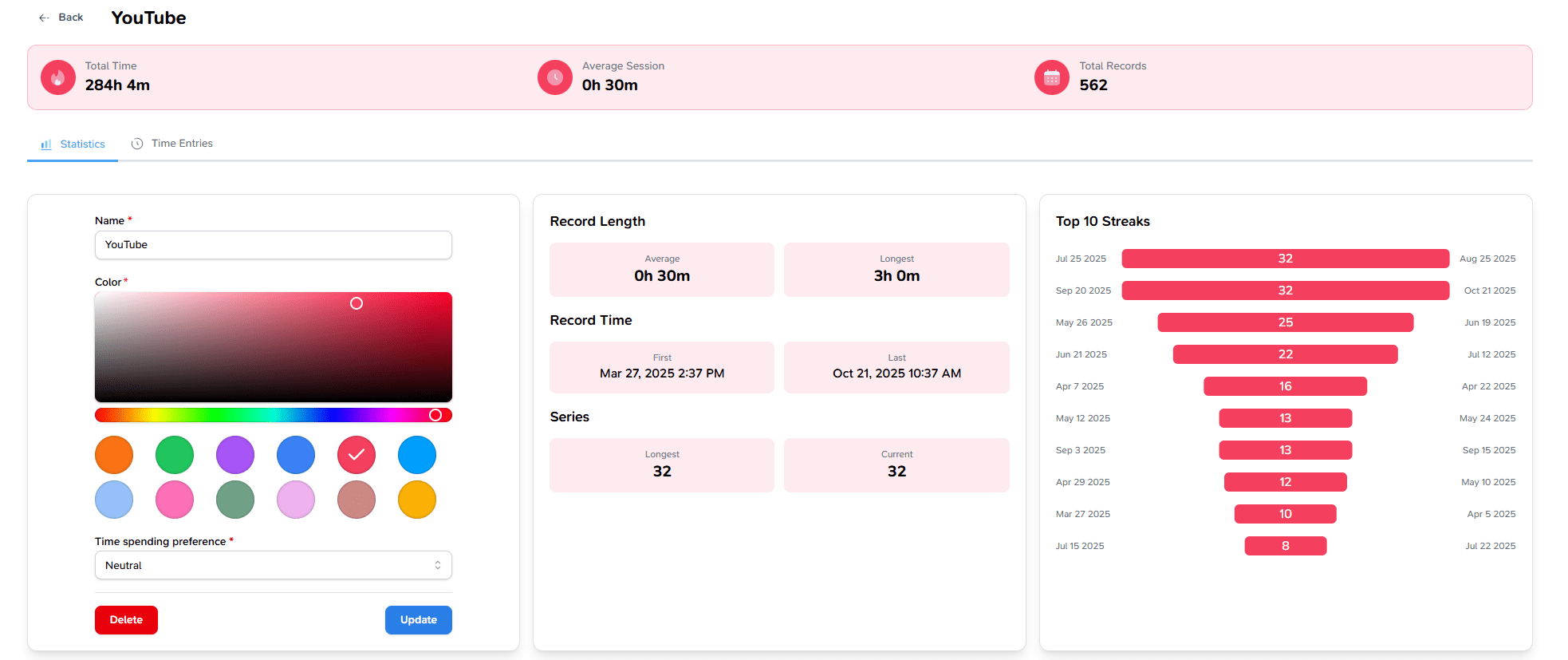
So, how do you start tracking without it being a pain? The key is to use a simple time tracking app that makes it almost fun - or at least visually satisfying. This is where InstaClock comes into play. InstaClock is an easy time tracker designed for individuals (like you and me) to understand our time better and build better habits. What makes it stand out is its emphasis on visual time tracking : instead of just giving you a boring timesheet, it transforms your tracked data into pretty charts and graphs that give you insight at a glance. For example, InstaClock will turn your day’s activities into a pie chart showing how your time is divided (study vs. Netflix vs. chores, etc.), and a calendar heatmap that highlights which days or hours you were most productive. It even offers weekly bar graphs and streak trackers - little visual motivators that let you see, say, how many days in a row you hit your study goal, or how your work hours stack up each day of the week. These features aren’t just gimmicks; they help you see patterns you never knew existed in your routine.

Why are visuals so helpful? Because raw numbers can be hard to interpret - but a pie chart instantly shows you, for example, that a huge slice of your day is going to “miscellaneous” time. A heatmap can reveal which days you tend to be most focused; maybe you see that Mondays are on fire but Thursdays are always weak, so you can adjust expectations or routines for those days. Streak trackers tap into our natural love for gamification - if you’ve worked out or studied 5 days in a row, you’ll want to keep that streak alive! All of this turns time tracking from a chore into a kind of personal dashboard for self- improvement. As InstaClock’s philosophy puts it, most trackers just count hours, but the goal here is to give you insights to actually improve your productivity. And when you visually see your progress (or pitfalls), it’s hugely motivating. It’s like having a mini coach on your phone or laptop, nudging you with data-driven feedback: “Mornings are your superpower - protect them for your important work!” , or “Hey, you spent 8 hours studying this week - here’s a celebratory chart, great job!”.
How to integrate time tracking into your routine: Start small. Maybe you track just one day to get a baseline - or track a few key activities (like “Study Time” and “YouTube Time” ) to see what a typical week looks like. Many find it eye-opening to log everything for a couple of days as an audit. In fact, productivity experts recommend auditing your time for 3-5 days - write down or use an app to record what you’re doing and for how long - to spot patterns, interruptions, and energy highs/lows. This audit itself can be motivating, because you’ll naturally start managing your time better once you’re observing it. Then, use a tool like InstaClock to regularly track the activities that matter to you: for students, this might be tracking class time, study time, and leisure; for remote workers, perhaps tracking project work, meetings, and personal breaks. Check the visuals every week and reflect: Where are the time leaks? When did I feel most productive? Am I allocating time to my top priorities? The data will guide you to tweak your routine. Maybe you’ll notice you tend to waste time on low-value tasks late in the afternoon - so you might start scheduling a break or a workout at that time to reset. Or you’ll see you concentrate well for about 90 minutes at a stretch but fade after - so you switch to 90-minute work blocks followed by a break. Over time, these adjustments, driven by your own time data, will refine your routine into something that truly fits you.
Oh, and one more perk: time tracking reduces anxiety and boosts motivation. It sounds strange, but many people feel relief once they have a clear record of what they did in a day. Instead of the guilty thought “I feel like I didn’t do enough” , you can look and see “Actually, I spent 6 solid hours on work and also took care of my health and chores. That’s a productive day.” Knowing that tends to replace self- doubt with a sense of accomplishment. And if the data shows you’re spending more time on distractions than you thought, that’s okay - it’s better to know and adjust than to wonder why you’re stressed. Think of tracking like shining a light in a dark room: once it’s lit, you can see clearly and take action.
Bringing It All Together: Your Routine, Your Rules
Designing a routine is a personal process. The best routine is one that aligns with your life, responsibilities, and natural rhythms - and it won’t be perfect on the first try. Give yourself permission to iterate. Maybe you’ll start with a simple daily routine for remote work: a consistent wake time, a morning ritual, defined work blocks with breaks, an evening shutdown, and time for family or personal stuff. Or if you’re a student, your first routine outline might block class times, study periods, some exercise, and social/free time in the evenings. Try it for a week and see how it feels. Use time tracking to catch where things aren’t working (e.g., “Oops, that 8am study block I planned is consistently getting ignored - maybe I’m not a morning study person”). Then adjust the routine: maybe study later, or swap that time for a morning jog if that wakes you up better.
Remember, routines are meant to serve you , not the other way around. They should relieve stress, not create it. So keep the tone light: if you slip up or a day goes completely off the rails, it’s fine. Life is messy! As one psychologist wisely noted, “Plans don’t always go as planned… be kind to yourself. It’s not easy to create new routines, so it may take time to get used to it”. Flexibility is key. The structure is there to support you, not box you in. Think of your routine as a template for your ideal day - one that makes sure you’re covering your priorities and self-care - but it can be tweaked anytime when reality intervenes.
Using tools like InstaClock can bolster your efforts by keeping you mindful and accountable in a friendly way. It’s pretty motivating to see a visual record of your improved habits over a month. And on days you feel off track, those visuals and streaks can gently nudge you back without any harsh judgment (just data!). For instance, if you’ve committed to a routine of writing every morning, InstaClock’s streak tracker might show you wrote 4 out of 5 weekdays - not 5/5, but hey, that’s 4 more days than when you had no routine! Tomorrow you can aim to hit that streak again.
In the end, building a daily routine that works is about finding balance. It’s structuring your day so that your important work, learning, or tasks get done, and you also have space for rest and the things you enjoy. It’s knowing when to focus and when to unwind. With time tracking insights guiding you and a bit of trial and error, you’ll create a routine that not only looks good on paper but feels good to live. Imagine waking up and mostly knowing what your day looks like, having a rhythm to follow, and still feeling free to adjust if needed. That’s what we’re aiming for - a simple, productive daily schedule tailored to you , with room for life’s spontaneity.
So, here’s to you taking charge of your day! Start small, be consistent, and don’t forget to celebrate the little wins ( checking off that task, hitting that 3-day study streak, or simply closing the laptop at 6pm like you planned). Over time, these add up to big changes. A well-crafted routine, enhanced with smart time management and maybe a simple time tracking app like InstaClock, can transform those chaotic days into a flow that actually works. You’ve got this!
Infographic Idea: To visually reinforce these concepts, imagine a “ Before vs. After ” infographic: on one side, a chaotic day without a routine (erratic timeline, lots of wasted gaps and stress emojis), and on the other, a well-structured day (clear blocks for work, study, breaks, and personal time) backed by time tracking data. For instance, the “after” could show a pie chart of a student’s day using InstaClock - with balanced slices for classes, homework, rest, etc. - versus the “before” pie chart where schoolwork was a tiny sliver lost amid procrastination. Such an infographic would make it clear how applying these routine tips and visual time tracking can turn an overwhelming day into a focused, productive one. 📊